Search & Products
Find and explore products with powerful search and detailed product pages.
Product Search
The search page provides a comprehensive product discovery experience.
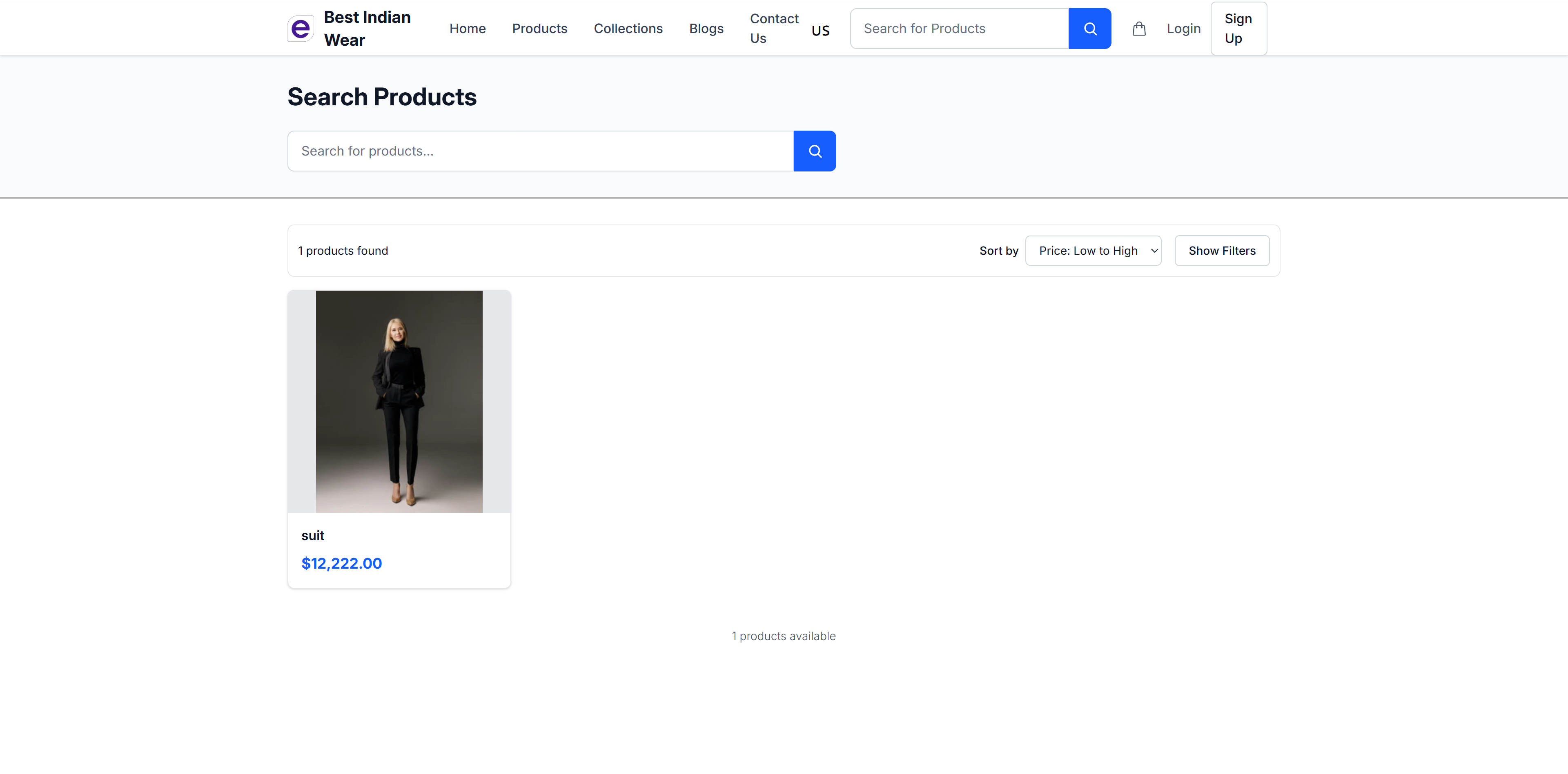
Search Features
- Search Bar - Full-text product search with autocomplete suggestions
- Result Count - Shows number of products found
- Sort Options - Sort results by:
- Price: Low to High
- Price: High to Low
- Newest First
- Name A-Z
- Filters - Toggle filter panel to narrow results by:
- Price range
- Category
- Brand
- Availability
Product Cards
Each product in search results displays:
- Product image
- Product name
- Price
- Quick click to view product details
Hover Effects
Product cards respond when shoppers move their mouse over them:
- Image zoom — The product photo zooms in slightly on hover
- Second image swap — When the store owner enables it (in the Theme Editor's product card settings), hovering fades the photo to the product's second image — for example the back view of a garment — giving shoppers a second angle without opening the product page. Products with only one photo simply keep their image.
Product Detail Page
Click on any product to view its full details.
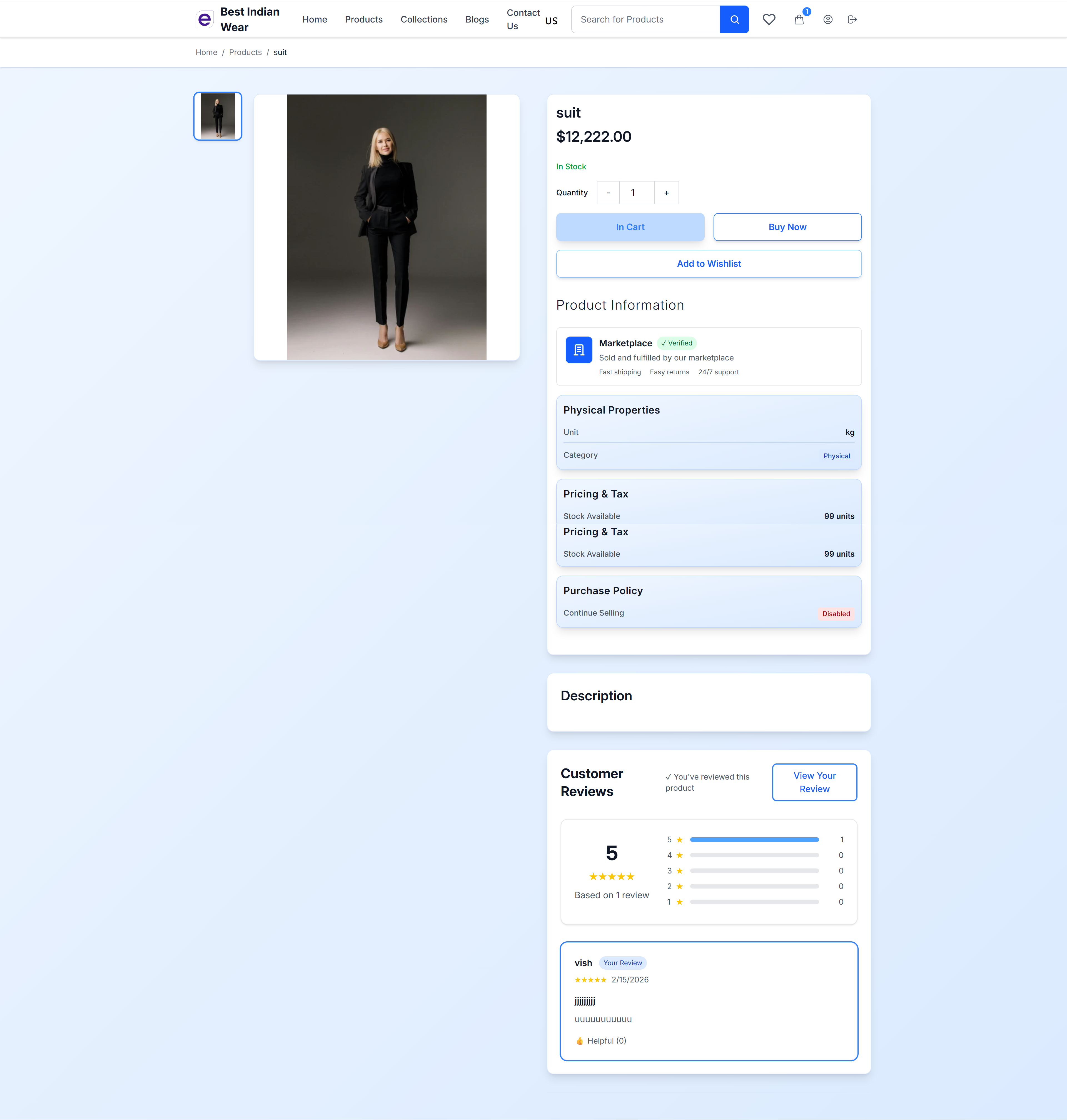
Product Information
The product page is organized into clear sections:
Header
- Product Name - Main product title
- Price - Displayed prominently
- Stock Status - "In Stock" or "Out of Stock" indicator
- Breadcrumbs - Navigation path (Home > Products > Product Name)
Purchase Actions
- Quantity Selector - Increase/decrease quantity with +/- buttons
- Add to Cart - Add the product to your shopping cart
- Buy Now - Skip the cart and go directly to checkout
- Add to Wishlist - Save the product for later
Product Information Card
- Marketplace Verified badge - Trust indicator
- Fast shipping, Easy returns, 24/7 support tags
Physical Properties
- Unit type (kg, lb, etc.)
- Category (Physical/Digital)
Pricing & Tax
- Stock available count
- Tax information
Purchase Policy
- Continue selling status (whether available when out of stock)
Description
Full product description with rich formatting, written by the seller.
Customer Reviews
The review section at the bottom of the product page includes:
- Overall Rating - Average star rating with visual bar chart
- Review Count - Total number of reviews
- Rating Distribution - Bar chart showing count for each star level (1-5)
- Individual Reviews - Each review shows:
- Customer name
- Star rating
- Date posted
- Review images (if any)
- Review text
- "Helpful" button with count
Customers who have purchased the product can submit their own reviews.
Product Recommendations
Below the product details, you may see personalized product recommendation sections (when enabled by the store owner from the Dashboard).
Recommendation Types
- Similar Products — Products related to the one you're currently viewing, based on category, tags, and shopping patterns
- Trending Products — Popular products across the store with the most views and purchases
- Category-Based — Other products from the same category
- Personalized — Products tailored to your browsing and purchase history
Where Recommendations Appear
- Product Page — Below the product details and reviews
- Home Page — Featured recommendations on the homepage (when enabled)
- Cart Page — Complementary product suggestions while reviewing your cart (when enabled)
Recommendations improve over time as the store collects more interaction data from shoppers.