Homepage
The storefront homepage is the first thing customers see when they visit your store. It's designed to showcase your brand, highlight products, and drive conversions.
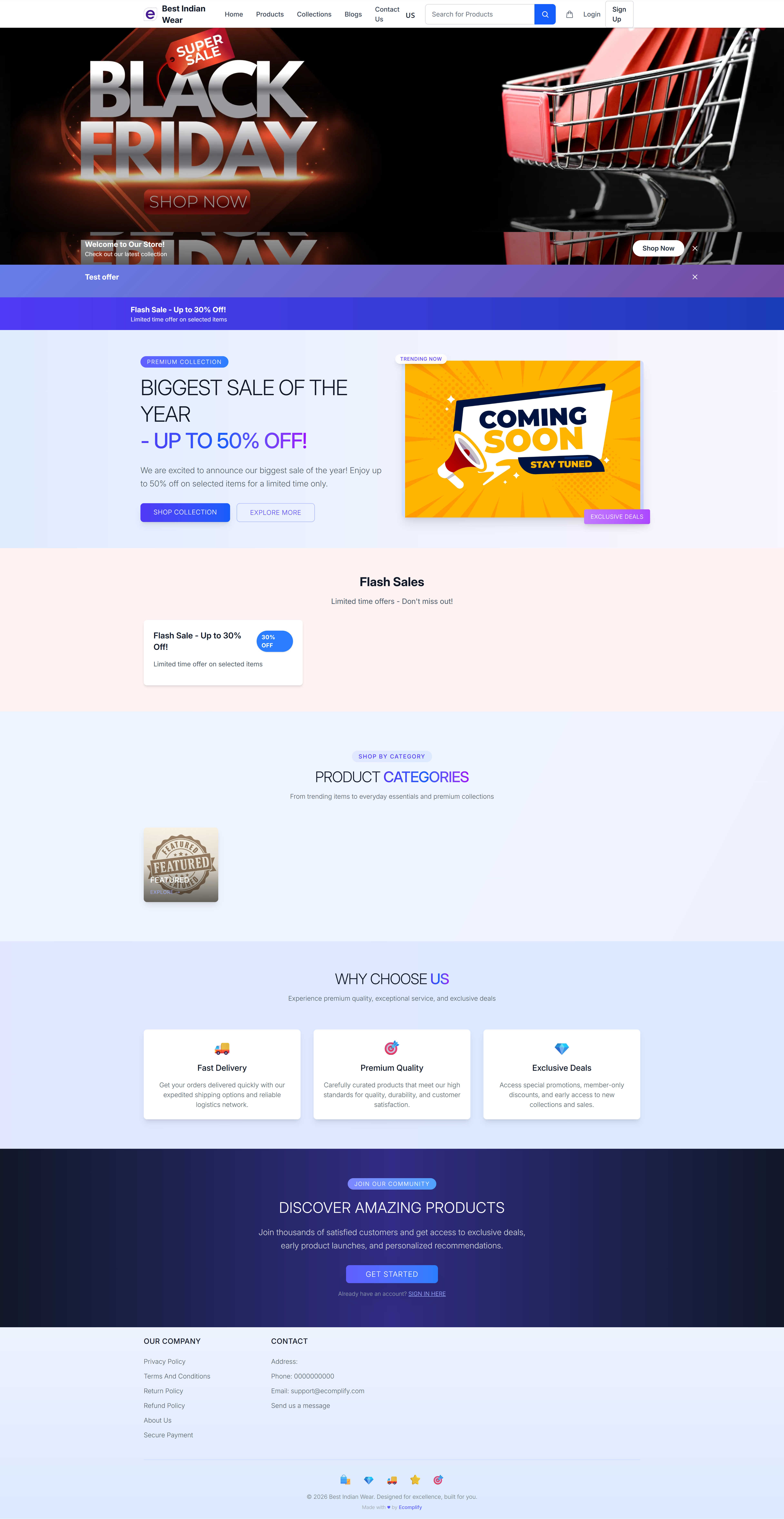
Homepage Sections
Hero Banner / Carousel
The top section features a configurable carousel or hero banner. This is managed from the Dashboard under Design > Appearance > Shop Carousel.
- Full-width banner images
- Clickable links to products or collections
- Support for multiple slides
- Mobile-specific banners
Announcement Bar
A top announcement bar for promotions and important messages:
- Flash sale notifications
- Discount announcements (e.g., "Up to 50% Off!")
- Coming soon teasers
- Configurable from Dashboard
Site-Wide Notice Bar
A slim notice bar can appear at the very top of the store — above the header, on every page, not just the homepage. It's meant for one short store-wide message:
- Holiday closure or delayed dispatch notices
- Shipping cut-off dates
- Service announcements
The notice holds a line of text and an optional small image or badge, and is switched on or off from the Dashboard under Settings > Advanced > Notice Settings. Its colors follow the announcement bar colors set in your brand styles.
This is separate from the Announcement Bar above: the announcement feeds promotional content into the homepage, while the notice bar is a plain banner shown across the whole store.
Flash Sales
A dedicated section for time-limited deals and flash sales with countdown timers.
Product Categories
Displays your product categories/collections to help customers navigate to what they're looking for.
Why Choose Us
A trust-building section highlighting your store's value propositions:
- Fast Delivery - Quick shipping details
- Premium Quality - Product quality commitment
- Extensive Collection - Catalog breadth
Discover Amazing Products
A featured products section encouraging customers to explore your catalog with call-to-action buttons.
Footer
The footer appears on all pages and includes:
- Our Company - About, Blog, Privacy Policy, Terms links
- Contact - Phone, email, social media links
- Copyright information
- All content configurable from Dashboard
Customization
All homepage content can be managed from the Dashboard:
| Section | Dashboard Location |
|---|---|
| Carousel/Banner | Design > Appearance > Shop Carousel |
| Announcement | Design > Appearance > Shop Announcement |
| Site-Wide Notice Bar | Settings > Advanced > Notice Settings |
| Logo & Branding | Design > Appearance > Shop Design |
| Navigation Menu | Design > Header Menu |
| Footer | Design > Footer |
| Social Links | Design > Social Links |
| Full Custom | Design > Custom Homepage |
For complete control, enable the Custom Homepage feature from the Dashboard to build your homepage with custom HTML, CSS, and JavaScript.