Cart & Checkout
Complete your purchases with a smooth shopping cart and secure checkout experience.
Depending on the store, your cart appears either as a slide-out drawer over the page you're on, or as a classic cart page.
Cart Drawer
On most stores, clicking the cart icon (or adding an item to the cart) slides a cart panel in from the side of the screen — you stay on the page you were browsing.
What's in the drawer
- Your items - Image, name, and price for each product, with +/− quantity buttons and a remove button
- Free shipping bar - Some stores show a progress bar telling you how much more to add to unlock free shipping — for example, "Add $12 more for free shipping"
- Order note - If the store enables it, a text box lets you add a note that travels with your order
- Checkout button - Takes you straight to checkout (the label may vary by store)
Press Escape, click the close button, or click outside the drawer to close it.
Applying a discount code in the drawer
- Click Have a discount code? near the bottom of the drawer
- Type your code and click Apply
- A valid code appears as a green chip with the discount shown in the totals, labeled with your code
- Click Remove on the chip to take the code off
If the code isn't valid, the reason is shown right below the input.
If a product in your cart is removed from the store's catalog, it disappears from your cart automatically — you'll never be blocked at checkout by an item that can no longer be ordered.
Shopping Cart
View and manage items before proceeding to checkout.
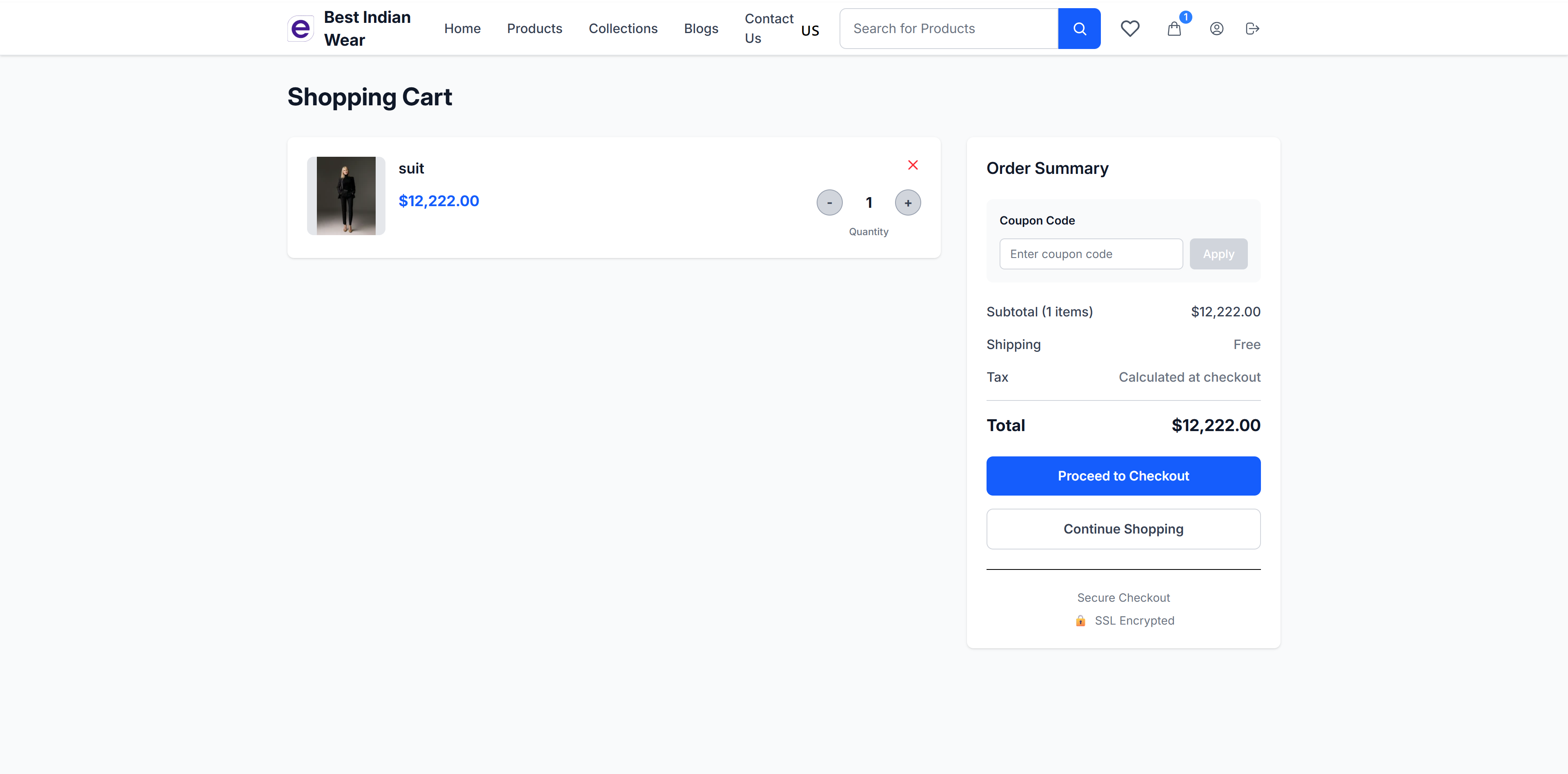
Cart Features
- Product Display - Each item shows:
- Product image thumbnail
- Product name
- Price (highlighted in blue)
- Quantity controls (+/- buttons)
- Remove button (X)
Order Summary
The right sidebar shows:
- Coupon Code - Enter a discount code and click "Apply"
- Subtotal - Sum of all items
- Shipping - Shipping cost or "Free"
- Tax - Calculated at checkout
- Total - Final amount
Gift Cards & Store Credit
The cart page's code box accepts both discount codes and gift card / store credit codes — just type your code and click Apply; the store works out which kind it is.
- A gift card shows as applied with its remaining balance, and that balance is deducted from the amount you pay at checkout
- The card is only actually charged when your order is confirmed, and its balance is re-checked at that moment — a card that has since been spent or disabled simply won't apply
- If the code isn't a gift card, it's automatically tried as a discount code instead, so you can't type it "into the wrong box"
Actions
- Proceed to Checkout - Move to the checkout flow
- Continue Shopping - Return to browsing
- Secure Checkout - SSL encrypted badge for trust
Checkout
The checkout process follows a clear, numbered step-by-step flow. Depending on the store, checkout opens as a full page or as a popup card over a dimmed background — the steps are the same either way.
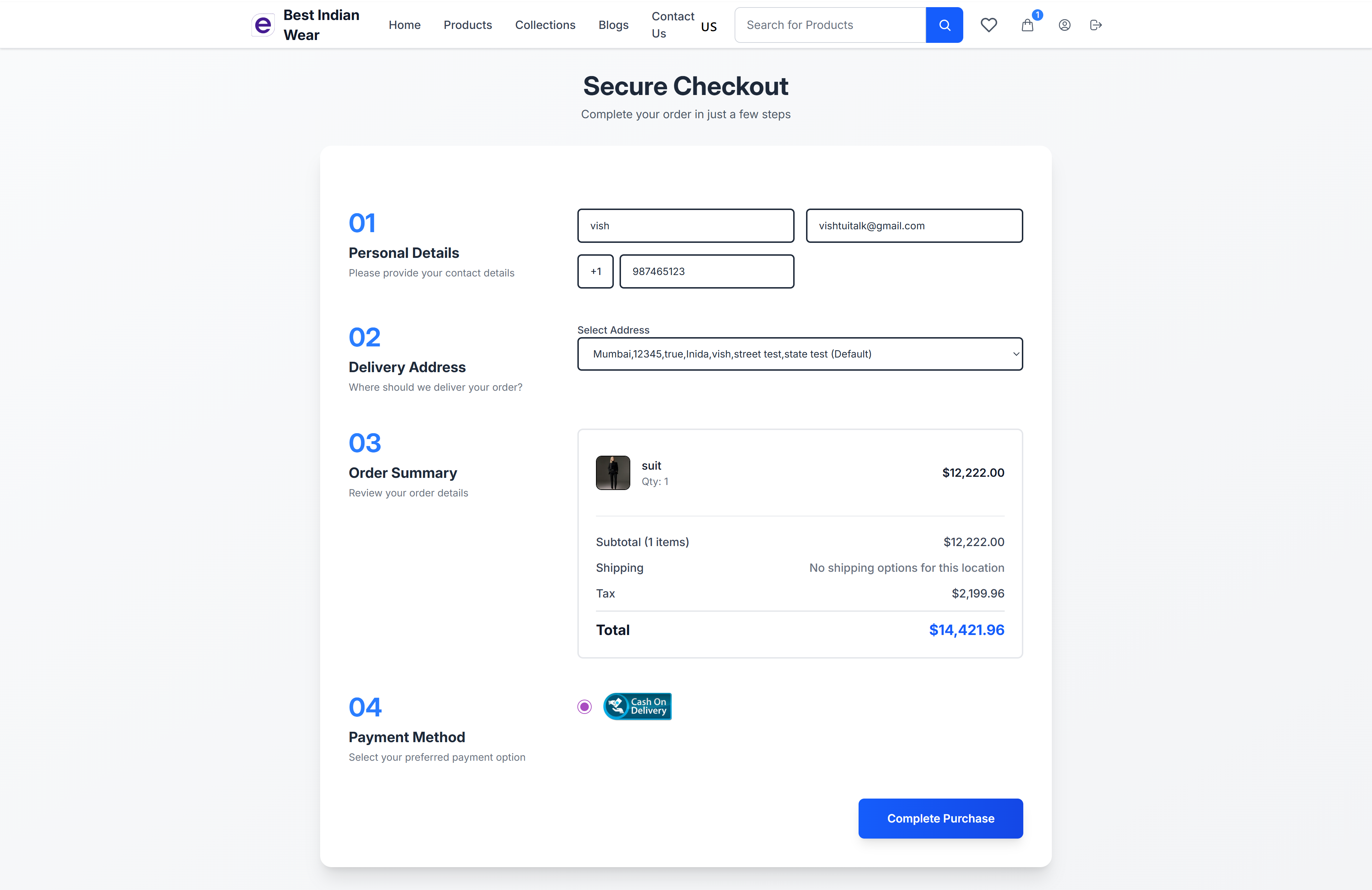
Step 1: Personal Details
Enter your contact information:
- Full name
- Email address
- Phone number (with country code)
Step 2: Delivery Address
Select or manage your delivery address:
- Choose from saved addresses via dropdown
- Option to add a new address
- Address includes city, state, country, and postal code
Step 3: Order Summary
Review your order before payment:
- Product images, names, and quantities
- Subtotal calculation
- Shipping cost (or "No shipping options for this location" if unavailable)
- Tax amount
- Total prominently displayed
Step 4: Payment Method
Select your preferred payment option:
- Cash on Delivery - Pay when the order arrives
- Stripe - Pay with credit/debit card — many stores also offer wallets and local payment options relevant to your country, such as Apple Pay, Google Pay, iDEAL, or Klarna (when enabled)
- Razorpay - Pay via Indian payment methods (when enabled)
- PayPal - Pay with your PayPal balance or a card via PayPal (when enabled)
Paying with PayPal
- Choose PayPal as your payment method and complete the purchase step
- You're redirected to PayPal to log in and approve the payment
- After approving, you're returned to the store's order confirmation page automatically
If you cancel on PayPal's side, your order isn't paid and you can pick another payment method.
Complete Purchase
Click Complete Purchase to finalize your order. You'll be redirected to the order confirmation page.
If you applied a gift card or store credit, the amount charged to your payment method is your total minus the card's balance. Some stores also require you to tick an agreement checkbox (e.g., accepting the Terms of Service and Refund Policy) before the purchase can be completed.
Order Confirmation
After successful purchase, you'll see the order confirmation page.
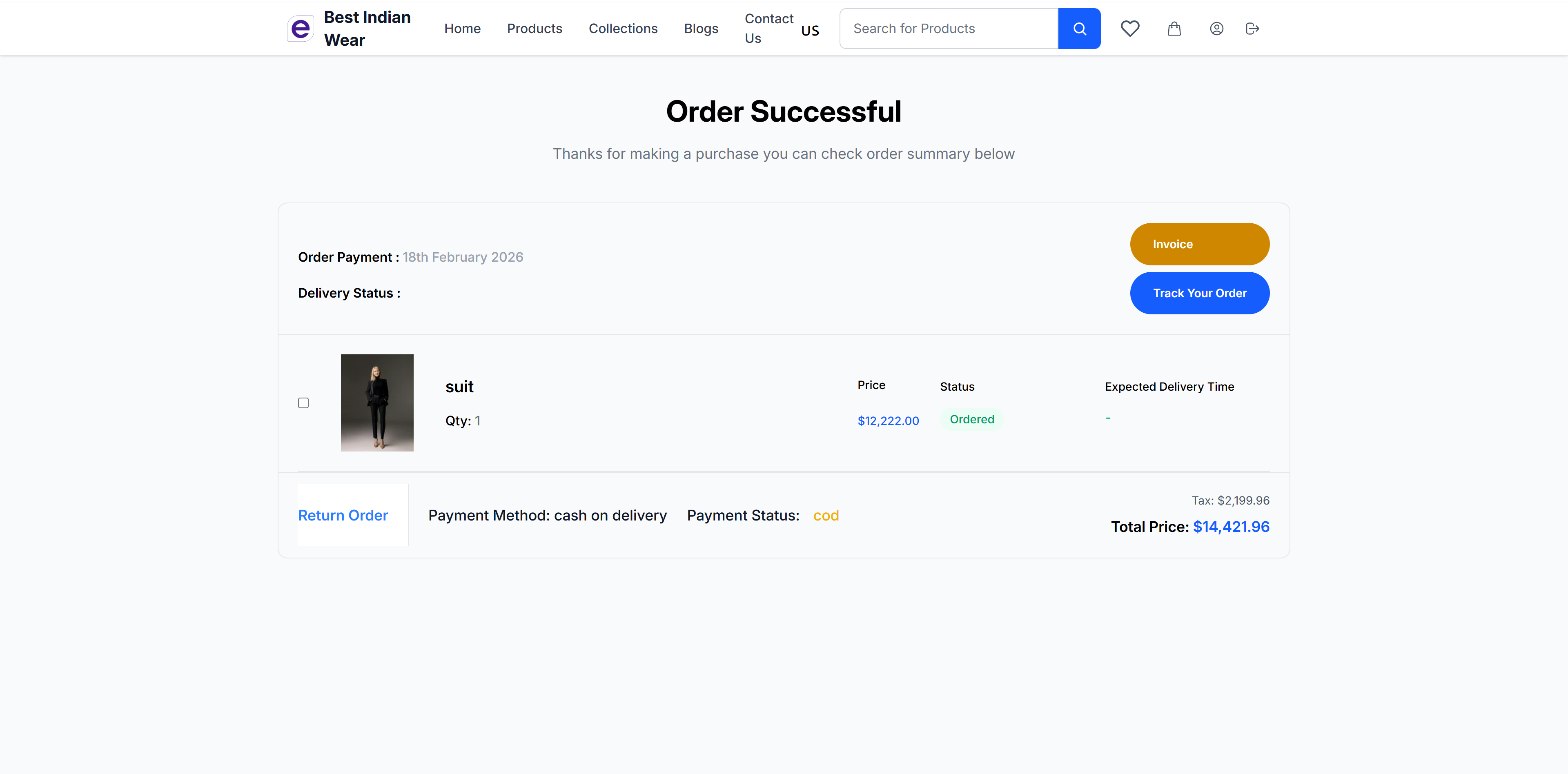
Confirmation Details
- Order Successful heading with confirmation message
- Order Payment Date - When the payment was made
- Delivery Status - Current delivery state
- Invoice button - Download/view the order invoice
- Track Your Order button - Go to order tracking
Order Items
- Product image, name, quantity
- Price and status for each item
- Return Order link for initiating returns
Payment Summary
- Payment method used
- Payment status
- Tax breakdown
- Total price
Abandoned Cart Recovery
If you add items to your cart but don't complete checkout, the store may send you recovery emails to help you complete your purchase (if you were logged in).
How It Works
- When you leave items in your cart without checking out, the store tracks this as an abandoned cart
- You may receive up to 3 recovery emails at intervals set by the store owner:
- Reminder 1 — A gentle nudge shortly after abandonment
- Reminder 2 — A follow-up reminder the next day
- Final Offer — A last chance email, sometimes with a discount code
- Each recovery email contains a direct link back to your cart with all your items restored
- Once you complete checkout, the recovery process stops automatically
Recovery Link
Click the recovery link in any email to return to the store with your cart items restored, ready to complete checkout.
If you receive a final offer email with a discount code, apply it at checkout to save on your order.